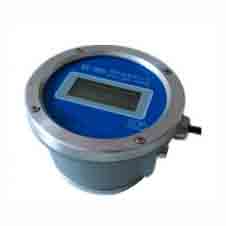
WX-988(ELZ) INTELLIGENT COUNTER
Product photos
Product Introduction
WX-988(ELZ) electronic display meter is a battery powered intelligent ultra low power instrument, the central processor using MSP430F247 chip, can be realized by setting the flow coefficient of sectional compensation, which can greatly improve the flow range.
Characteristics
① Adopt MSP430F247 chip, liquid crystal display, ultra low power consumption.
② The use of ferroelectric data memory, with a high reliable data loss protection function (storage speed is fast, numerous times on power impact data is not lost).
③ High precision D/A converter chip to ensure stable output of 4-20mA current.
④ Built-in button and reset button, the external use of buttons, complete functional operation.
⑤ Pulse output function.
⑥ The external environment temperature is less than five degrees Celsius, it can automatically heating, to ensure the normal operation of the display.
⑦ RS232 and RS485 communication interface, and computer and other intelligent instrument online work.
Instrumentation diagram
Display mode:
Double low LCD display, the default display is as follows:
On XXXXXXXX seven bit instantaneous traffic (m3/h or L/h)
Lower XXXXXXXX eight bit cumulative traffic (m3 or L)
You can also set to the following display via the P25 parameter:
On XX.XXXXX seven bit cumulative traffic (m3 or L)
Lower XXXXXXXX eight bit instantaneous flow (m3/h or m3/L)
External power supply mode, battery power supply mode and battery power display
Instructions
4.1 Instrument parameter code description
| Code | Description |
|---|---|
| P00 – P04 | Five pulse equivalent of flow meter (unit: L, P22 parameter is set to 0, only P00 coefficient is valid). |
| P05 | Maximum flow rate for flow meter (for 4-20mA, unit: m3/h). |
| P06 | Instantaneous return to zero time, greater than this time, no flow signal, instantaneous return to zero (units: seconds). |
| P07-4-20mA | zeroing (usually 23, adjustable). |
| P08-4-20mA | is full (usually 3950 adjustable). |
| P09 | Instantaneous unit selection (set to 0 for M3/h and set to 1 for L/min). |
| P10 | Instantaneous calculation period (in seconds). |
| P11 – P14 | Segment value of flow meter, unit: m3/h (when used at P09≠0). |
| P15 – P18 | Sectional value of flow meter, unit: L/min. (when P09=1, use this unit). |
| P19 | Pulse output width. (output pulse, high level, unit M5) |
| P20 | Pulse output mode. (1 for real-time pulse output, 0 for modulating pulse output) |
| P21 | Pulse equivalent value when modulating pulse output (P20 is valid at 0). |
| P22 | Sectional equivalent switch. (Set 0, without subsection, with coefficient P00. Set 1, piecewise factor P00-P04) |
| P23 | Mailing address. (0~16) |
| P24 | Baud rate. (set 0 to 2400, set 1 to 4800, and set 2 to 9600) |
| P25 | Display the content parameters, display the content parameters (set to 0 when the screen above display tired measurement, below shows instantaneous amount; set to 1 when the screen shows instantaneous amount, below shows tired measurement) |
| P26 | Restore factory settings. (set to 123, save and exit to restore factory settings). |
| P27 | Signal input sensor type (0: root sensor, 1: sender, Holzer, encoder). |
| P28 | Communication check bit setting (0: no parity bit, 1: parity check, 2: parity check). |
4.2 button operation
① The instrument consists of 4 buttons above the reset button, below from left to right, it’s □key, □key, □key.
② The reset key in the instrument assembly, inserted into the display panel, press the reset button, the screen began to show work
4.3 coefficient setting
① Work or standby, press □and □key at the same time, the P00 will flash, and the instrument will enter the coefficient setting state.
② Parameter code PXX, when flashing, press □or □key, you can find the corresponding code, show below for the code parameter values.
③ To modify parameter values, press the □key to move to the point where it needs to be modified, press □or □key to increase or decrease the value.
④ Save and exit, press the □and □key at the same time, and it’s released quickly, then the instrument display figure① – press the □and □key for 5 seconds at the same time, the instrument display figure② – the instrument parameters saved successfully, if the instrument display figure③, parameters save failed, need to re set.
(Figures ①、②、③: Screens showing -------, End, Err respectively)
⑤ Press the □key, the screen displays the single flow or total flow alternately, the figure displays the following:
(Screens showing 8,8,8,8,8,8,8,8 L and 0,0,0,0,0,0,0,0,0 m³/h)
Example: Modification by P00 = 0000.1234, the following steps:
I. Press down □key and □key – pressing two times, enter the coefficient set state.
II. Press □key, the digit of the first flashing, Press □key or □key, adjust to 0.
III. Press □key, the second digit turn to 0.
IV. And so on, to P-00 value is adjusted to 0000.1234, and then press down □key and □key at the same time, exit, set.
③ WX-988 (ELZ) Intelligent counter testing method
(1) The debugging instrument, first the P22 set to 0.
(2) The P10 Set 2
(3) Select the amount of units, P09 to 0. (Unit: m3/h)
(4) So that in the flow meter run, adjust the P00 pulse equivalent to the number and the actual number of instruments showed consistent.
(5) Set the P06 minimum flow rate of about one-third, when the transient is less than P06, the minimum flow rate will appear as 0.
Single flow, total flow clear
(1) Single flow cleared
Press down the □key is not loose, about 5 seconds on the screen flow show as 0, release the daily flow after the completion of traffic cleared.
(2) Total flow of clear
Press down the □key is not loose, about 10 seconds after the screen shows the total volume of 0, release the reset after the completion of the total flow.
Note:
I. The unit of single flow is L, the total flow is m3.
II. At first, the single flow and the total flow will have four decimal places.
III. When the screen shows the expiration value, the decimal point after the shift automatically.
IV. The expiration of the time when no decimal, (it’s 9999999), automatically cleared.
Parameter
① Input: voltage pulse.
② Display: LCD paragraph document.
③ Power Supply: DC3.6V battery can supply more than two years, the battery power is low battery icon will flash to prompt the user to replace the battery.
④ External power supply is DC24V or DC12V.
⑤ Output: pulse, 4~20mA, 1~5VDC, 2~10VDC, 0~10VDC, RS232, RS485
Single flow and total flow switching, single flow return to zero
(Image of instrument and button description: Switch flow, Return to zero)
Note: The instrument shows this status, presses for 5 seconds, and the single flow returns to zero.
Note: The description may be different with the product, please contact us for quotation.
Click here to contact us via whatsapp for details
Tag: Our other products